
When a new client signs up for one of our content marketing services, the payment is just the start. What happens next is where things can either scale or spiral. We wanted a system that was fast, flexible, and totally hands-off.
Here’s how we built exactly that using Gravity Forms on our WordPress site, n8n, and Notion.
No Zapier. No duct tape. Just one automated workflow that takes a new client from payment to production.
The Challenge
Client onboarding used to be manual and scattered. After someone paid, we had to:
- Send a follow-up email to the client with a form to fill in
- Wait for them to fill it in and provide their details
- Copy their answers into three Notion databases
- Create a job page
- Link that job to our product database
- Link that product to our company database
- Assign the job to a writer
- Start the production phase
None of it was hard or too time-consuming in its own right, but it was slow, repetitive, and error-prone. Multiply that by five clients in one month and suddenly someone is spending half their time on logistics.
We didn’t want a part-time project manager. We wanted one seamless system to flow:
Client pays → fills out form → database records get created and linked → the job begins
So we built it.
The Tech Stack
We kept the stack lightweight but flexible:
- Gravity Forms to collect structured data with a user-friendly form on our website
- n8n to automate the logic, handle the data, and glue everything together
- Notion as our central workspace and project database
This isn’t locked to our tools. You could swap in Tally, Airtable, or Google Sheets. In fact, we started out using Relay.app for the automations as it was simpler to get familiar with early on.
The key is having a structured input, a smart middleware layer, and a unified destination.
The Flow
1. Client completes payment and gets redirected to a Gravity Form
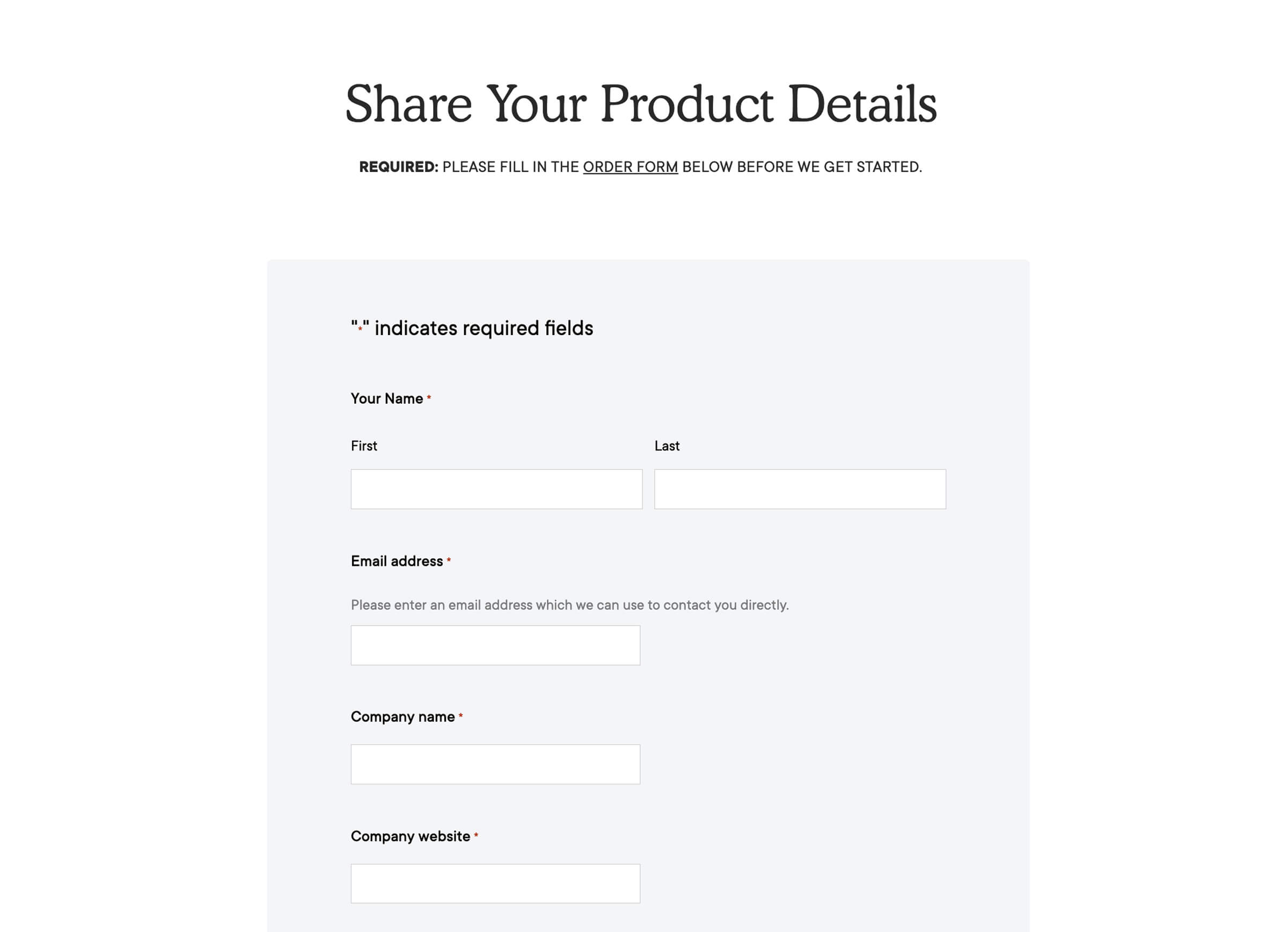
Once someone pays for a content marketing service, they’re instantly redirected to a form built in Gravity Forms.
This form collects:
- Client name
- Email and company details
- Product name and website
- A plain-English description of their product
- Target audience
- The main problem their product solves
- Attachments (like screenshots or pitch decks)
The form is designed to feel like a conversation, not a chore. It gives us all the context we need to start work without another email thread.
2. Gravity Form sends data to n8n via webhook
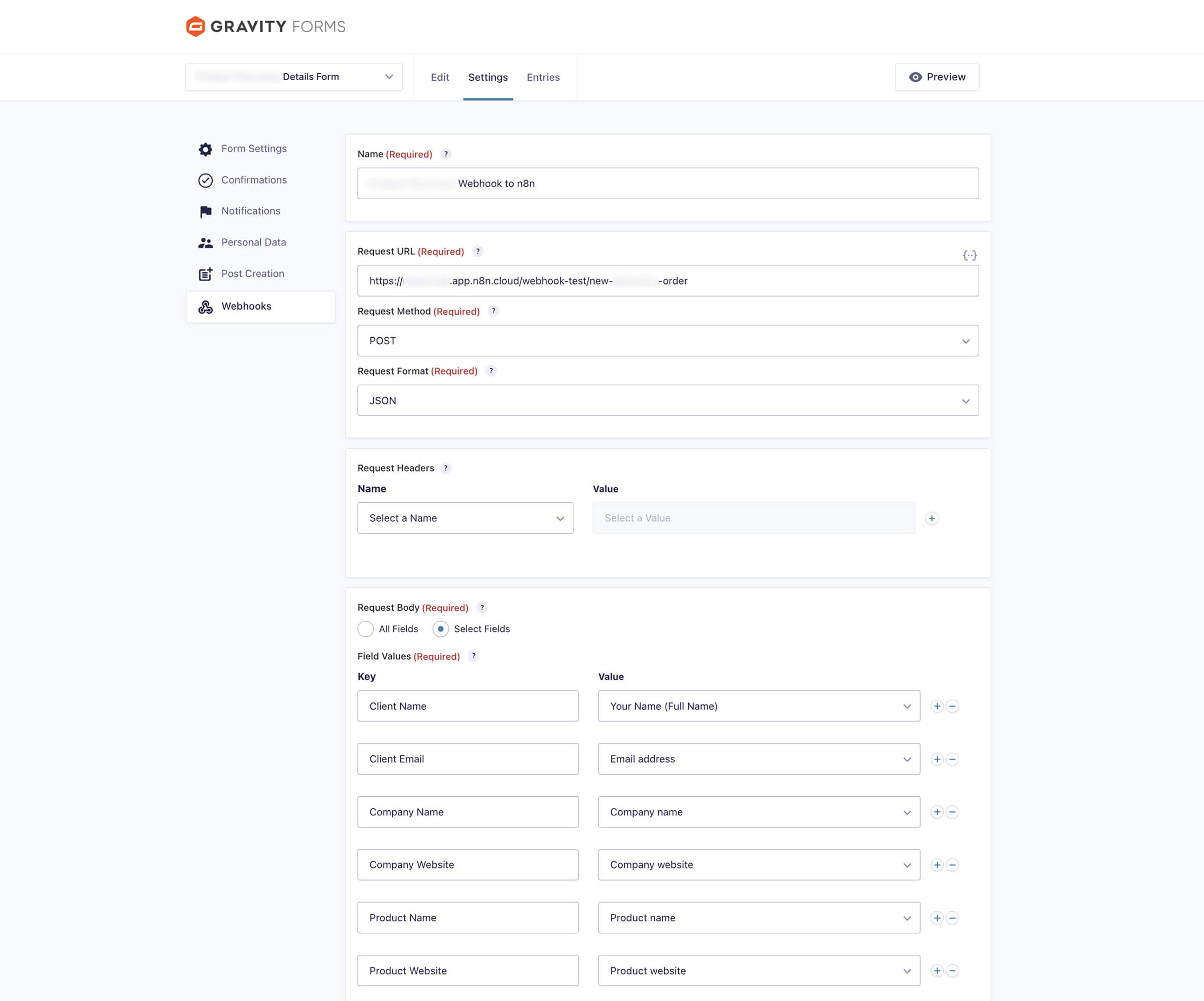
We use Gravity Forms’ webhook addon to POST the form submission to an n8n webhook URL. This lets us receive the raw data instantly, without waiting or polling.
Inside the webhook settings, we:
- Set the request format to JSON
- Choose specific fields to include
- Pass through the full client input
3. n8n does the heavy lifting
This is where the automation logic lives.
Our n8n workflow runs the following automated steps, one after another:
- Receives the webhook
- Parses and formats the data to standardize it
- Creates a new record in our Notion “Opportunities” database
- Checks if the product already exists in our “Products” database
- If it doesn’t exist, it creates it and stores its page ID
- Relates the opportunity to the correct product
- Creates a production job tied to that opportunity
- Updates the record with any remaining details or statuses
The logic includes conditional paths, fallback handling, and field mapping, yet it all runs in seconds.

What It Costs to Set Up
You don’t need a massive budget to build this system. Here’s the breakdown:
- Gravity Forms + Webhooks Add-On: Requires the Elite license ($259/year).
- n8n: Get the Starter plan at $20/month, billed annually.
- Notion: The free version is more than enough to get started.
That’s it. No enterprise tools and no engineering hours. Just a few solid components that play nicely together.
Why This Works
This system removed nearly every manual step we used to touch.
- Zero manual handling after form submission
- Consistent structure for every project
- Linked records mean you can trace any opportunity to a product and any product to a job
- No setup delay
- Scalable whether you onboard 1 or 20 clients in a week
By the time the client hits “submit” on the form, everything is already set up internally.
Notion has the opportunity created, connected to the right product, and ready for production.
It means our team opens Notion and sees exactly what needs doing. No DMs, no waiting, no guesswork.
Where We’ll Improve It Next
Right now, it works, but great systems always continue to evolve.
Here’s what we’re planning:
- Chat notifications to alert team members when a new job comes in
- Auto-generated internal briefs using AI based on form responses*
- Client confirmation summaries, sent back to the client after submission
- Smart categorization of client goals using AI tagging (for analytics and prioritization)
*This part is already partially automated, but it hasn’t made it into the workflow just yet. We only do that once the manual version is working exactly the way we want it to. At that point, it’s reliable enough to produce quality work.
The goal isn’t just speed. It’s clarity and focus; getting the right context in front of the right person at the right time.
Build It Yourself
If you’re running any kind of service business and still doing manual intake, this is your sign.
You don’t need expensive tools. You don’t need Zapier limits or API headaches. You need:
- A structured form
- A smart automation layer (like n8n)
- A central workspace (like Notion)
From there, it’s all about clarity. What gets created, when, and how it connects.
Start with one flow. Run it a few times. Refine. Then build out.
This system replaced hours of weekly admin with something we don’t even think about anymore, which is exactly how automation should feel.
Want This Built for You?
If your current onboarding process is messy, manual, or just plain slow, we can fix it for you.
We help lean teams and solo operators implement smart systems like this one using tools you already have or ones we trust.
Want to automate your client workflows without hiring more people? Request a free consultation and let’s map it out together.
